
Awesome Oscillator (AO): Complete Guide for Algorithmic Trading
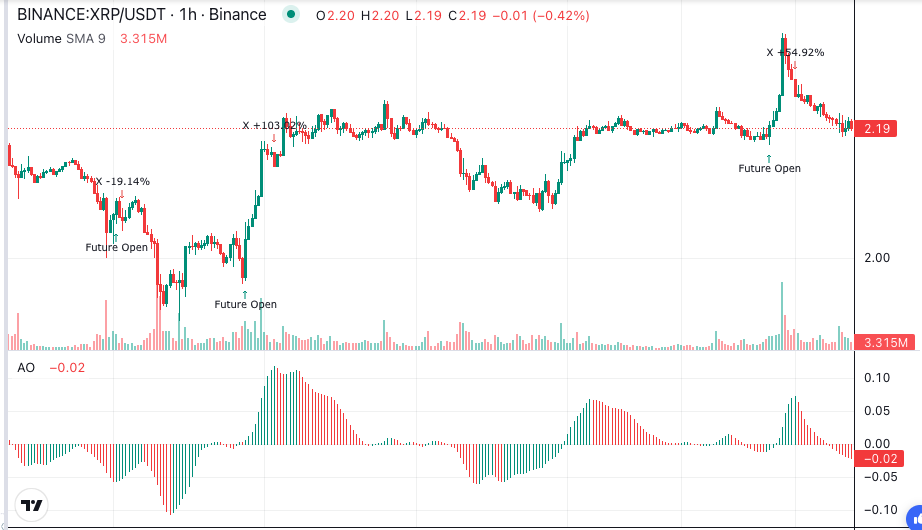
The Awesome Oscillator is one of the most visual momentum indicators available to algorithmic traders. Created by legendary trader Bill Williams, the Awesome Oscillator measures whether bullish or bearish forces currently drive the market. It does this by comparing recent momentum against a longer baseline, making it a powerful tool for confirming trends and spotting reversals.
What Is the Awesome Oscillator?
The Awesome Oscillator is a momentum indicator that calculates the difference between a 5-period and 34-period simple moving average of the bar’s midpoint price. The midpoint is simply the average of each bar’s high and low. When the short-term average sits above the long-term average, the Awesome Oscillator produces a positive value. When it falls below, the value turns negative.
Bill Williams introduced the Awesome Oscillator as part of his trading system in the 1990s. Unlike indicators that rely solely on closing prices, the Awesome Oscillator uses the midpoint (high plus low, divided by two). This captures a more balanced view of where price actually traded during each period, rather than just where it finished.
The indicator displays as a histogram that oscillates around a zero line. Green bars appear when the current bar is higher than the previous bar. Red bars appear when it is lower. This colour coding makes it easy to see momentum shifts at a glance — a feature that translates well into visual block-based strategies.
How Is the Awesome Oscillator Calculated?
The Awesome Oscillator uses a straightforward two-step process. First, calculate the midpoint of each bar by adding the high and low, then dividing by two. Second, subtract the 34-period simple moving average of those midpoints from the 5-period simple moving average.
In plain terms: take the average midpoint over the last 5 bars and subtract the average midpoint over the last 34 bars. A positive result means short-term momentum exceeds the longer trend. A negative result means the longer trend dominates.
The 5 and 34 periods are not arbitrary. Williams chose them because 5 represents roughly one trading week and 34 is a Fibonacci number that captures approximately seven weeks of price data. This combination balances sensitivity with stability.
How to Read Awesome Oscillator Signals?
The Awesome Oscillator generates three primary signal types that algorithmic traders rely on.
Zero-Line Crossover
The simplest Awesome Oscillator signal occurs when the histogram crosses above or below zero. A cross above zero suggests bullish momentum is building. A cross below zero suggests bearish momentum is taking control. This signal works best in trending markets and can trigger entry or exit rules in a systematic strategy.
Twin Peaks (Divergence)
A bullish twin peaks pattern forms when the Awesome Oscillator creates two peaks below zero, and the second peak is closer to zero than the first. This suggests selling pressure is weakening. The bearish version mirrors this above zero — two peaks where the second is closer to the zero line, indicating fading bullish momentum.
Saucer Signal
The saucer signal catches momentum shifts within an existing trend. A bullish saucer requires three consecutive bars above zero: the first red, the second red but smaller, and the third green. This sequence shows that a pullback within an uptrend is ending and momentum is resuming. The bearish saucer mirrors this pattern below the zero line.
What Are the Best Awesome Oscillator Trading Strategies?
Trend Confirmation with Moving Averages: Combine the Awesome Oscillator zero-line crossover with a 200-period moving average filter. Only take long signals when price trades above the 200 MA and the Awesome Oscillator crosses above zero. Only take short signals below the 200 MA. This filter dramatically reduces false signals in ranging markets.
Twin Peaks Reversal Strategy: Watch for the Awesome Oscillator twin peaks pattern near support or resistance levels. Enter when the histogram bar following the second peak changes colour. Set your stop-loss below the recent swing low for bullish setups. This strategy works well on 4-hour and daily timeframes where twin peaks patterns are more reliable.
Multi-Indicator Momentum: Pair the Awesome Oscillator with the MACD for double confirmation. When both indicators cross their zero lines in the same direction simultaneously, the signal carries significantly more weight. Disagreements between the two can keep you out of choppy markets.
What Are Common Awesome Oscillator Mistakes to Avoid?
Trading every zero-line cross. In sideways markets, the Awesome Oscillator whipsaws repeatedly across zero. Always add a trend filter or volatility condition to reduce false signals.
Ignoring the broader trend. The Awesome Oscillator measures momentum, not direction. A bullish saucer signal during a strong downtrend often leads to a losing trade. Confirm the trend on a higher timeframe first.
Using it alone. Bill Williams designed the Awesome Oscillator as part of a complete system that included fractal analysis and other tools. Relying on the Awesome Oscillator without supporting indicators or price action context leads to inconsistent results.
Misidentifying twin peaks. Both peaks must sit on the same side of the zero line. A peak above zero and a peak below zero is not a valid twin peaks pattern. Systematic traders can define exact rules for pattern detection to eliminate this human error.
How to Build Awesome Oscillator Strategies in Arrow Algo?
Arrow Algo’s no-code visual block builder makes the Awesome Oscillator accessible to every trader. Drag the Awesome Oscillator indicator block onto your canvas, connect it to your preferred data source, and the platform handles all calculations automatically.
Use condition blocks to define your entry rules — for example, trigger a buy when the Awesome Oscillator crosses above zero while a moving average filter confirms an uptrend. Add exit conditions using the saucer signal or a fixed take-profit level. Arrow Algo lets you backtest these combinations against real historical exchange data before risking any capital.
The visual approach removes the need to manually calculate midpoints or track histogram colours. You focus on the logic of your strategy while the platform handles the maths. That means faster iteration and fewer errors than manual chart reading.
What Are the Key Takeaways?
- The Awesome Oscillator measures momentum by comparing 5-period and 34-period midpoint averages
- Three core signals: zero-line crossovers, twin peaks divergence, and saucer patterns
- Always combine the Awesome Oscillator with trend filters to avoid false signals in ranging markets
- Twin peaks patterns must form entirely above or entirely below the zero line to be valid
- Pair with MACD or moving averages for stronger confirmation
- Arrow Algo’s visual blocks let you build and backtest Awesome Oscillator strategies without writing any code
Educational disclaimer: This content is for educational purposes only and does not constitute financial advice. Trading involves significant risk and you should only trade with capital you can afford to lose. Past performance is not indicative of future results.
Disclaimer: The information provided in this article is for educational purposes only and does not constitute financial advice. Trading involves significant risk and you should only trade with capital you can afford to lose. Past performance is not indicative of future results. Always conduct your own research before making any trading decisions.
Ready to build your own automated trading strategies without writing a single line of code? Start for free at Arrow Algo and join thousands of traders who’ve made the switch to systematic trading.