
Lag Block: Complete Guide for Algorithmic Trading
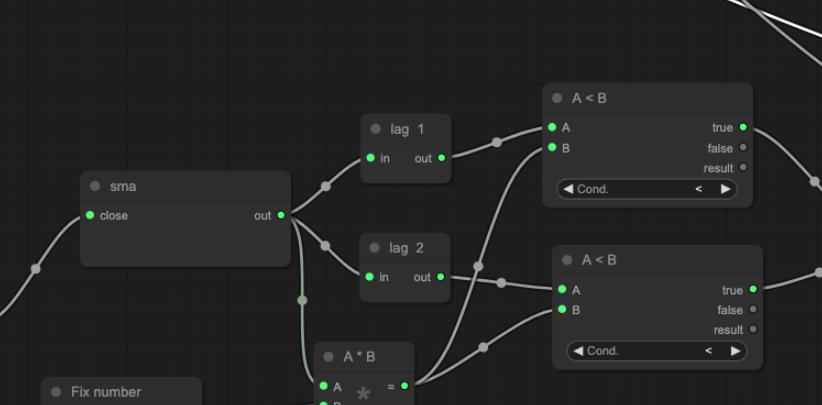
The Lag Block is a utility indicator that delays input data by a specified number of bars, giving algorithmic traders a precise way to compare current values against past ones within a single strategy.
What Is the Lag Block?
The Lag Block is a time-shift tool. It takes any data stream — price, indicator output, volume — and outputs the value from n bars ago. With a lag of 1 on a 15-minute chart, the block outputs the previous candle’s value. With a lag of 5, it outputs the value from five candles ago.
On its own, it does not generate signals. Its power comes from pairing it with other blocks. By feeding current and lagged values into a comparison, you can measure change, detect divergence, and build momentum logic — all without writing a single line of code.
What Does the Lag Block Measure?
The Lag Block measures the displacement between the present and the past. Whatever data you pass in, it holds that data in memory and releases it n bars later.
Common uses:
- Price comparison: Pass in the close price with a lag of 1 to compare today’s close against yesterday’s.
- Indicator comparison: Pass in RSI with a lag of 3 to check whether RSI is higher or lower than it was three bars ago.
- Change calculation: Subtract the lagged value from the current value using a subtraction block to get the raw change over n bars.
- Momentum detection: Check whether an indicator is accelerating or decelerating by comparing current vs lagged slope values.
How Does the Lag Block Work?
The Lag Block takes two inputs: the data stream you want to delay, and the lag period (the number of bars to shift back). The output is simply the input value from n bars ago.
There is no smoothing, no weighting, and no transformation — the Lag Block outputs an exact historical value. That precision is what makes it so useful as a building block inside more complex strategies.
One thing to keep in mind: the first n bars of your strategy will not produce a valid lagged output. The block needs n bars of history before it can start returning values. Most backtesting engines handle this with a warm-up period automatically.
What Are the Best Ways to Use the Lag Block in Trading Strategies?
Rate of Change Without a Dedicated Indicator
Feed your close price into a Lag Block with a period of 10. Then subtract the lagged output from the current close using a subtraction block. The result is a custom rate of change — how much price has moved in the last 10 bars. You can then apply a threshold to this to generate signals.
Confirming Indicator Momentum
Take your RSI output and pass it into a Lag Block with a period of 3. Compare the current RSI against the lagged RSI using a comparison block. If current RSI is greater than lagged RSI, momentum is building upward. This acts as a confirmation layer on top of standard RSI threshold signals.
Detecting Trend Acceleration
Calculate an EMA slope using a Linear Regression Slope block. Feed that slope into a Lag Block. Compare current slope to lagged slope. When the current slope is steeper than it was n bars ago, the trend is accelerating — a useful filter for trend-following entries.
What Are Common Lag Block Mistakes to Avoid?
- Using too short a lag: A lag of 1 creates comparisons between adjacent bars, which can be noisy. Consider whether a slightly longer lag period gives more meaningful comparisons for your timeframe.
- Ignoring the warm-up period: The first n bars of any lagged output are invalid. Signals generated during the warm-up period should be excluded from backtesting results.
- Lagging the wrong data stream: Lagging a raw price is different from lagging a smoothed indicator. Know which you need — raw price comparison measures movement, while lagging a moving average measures trend change.
- Confusing lag with smoothing: The Lag Block does not smooth data. It shifts it. If you need a smoothed comparison, apply a moving average first, then lag the result.
How to Build Lag Block Strategies in Arrow Algo
Arrow Algo’s visual block builder makes the Lag Block straightforward to work with. Drag it onto your canvas, connect your chosen data source to its input, and set the lag period in the block’s properties. The output wire carries the historical value ready to connect into any comparison or calculation block.
A practical setup to try:
- Add a Close Price block as your data source.
- Connect it to a Lag Block — set the period to 5.
- Connect both the current close and the Lag Block output into a Subtraction block.
- Feed the result into a Comparison block — check whether the change exceeds a threshold.
- Use the comparison output as a signal condition in your entry logic.
This gives you a simple but effective 5-bar momentum signal, built entirely with visual blocks and no code. You can swap the close price for any indicator output — RSI, MACD, volume — and the same logic applies.
Learn more about combining slope indicators with comparison logic to build trend-confirmation strategies in Arrow Algo.
Key Takeaways
- The Lag Block delays any input by a specified number of bars, outputting the historical value exactly.
- It does not smooth or transform data — it shifts it in time.
- Its main use is enabling current-vs-past comparisons inside a strategy.
- Common applications include rate of change, indicator momentum, and trend acceleration detection.
- The first n bars are invalid — account for the warm-up period in your backtesting setup.
- In Arrow Algo, connect any data source to the Lag Block input, set your period, and wire the output into comparison or calculation blocks.
Disclaimer: This content is for educational purposes only and does not constitute financial advice. Trading involves significant risk and you should only trade with capital you can afford to lose. Past performance is not indicative of future results. Always conduct your own research before making any trading decisions.
Ready to build your own automated trading strategies without writing a single line of code? Start for free at Arrow Algo and join thousands of traders who’ve made the switch to systematic trading.