
Trailing Stop: Complete Guide for Algorithmic Trading
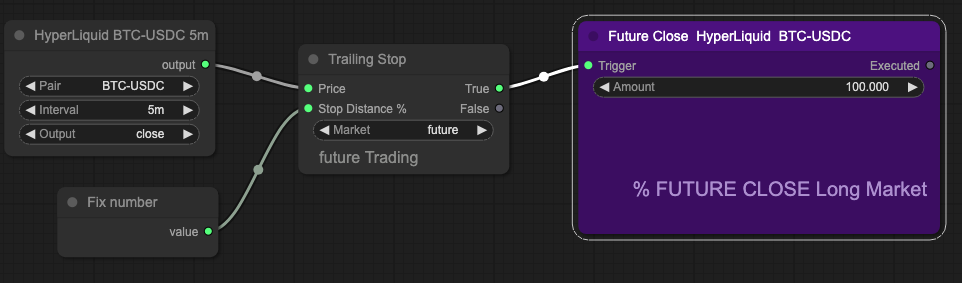
The Trailing Stop is a dynamic exit mechanism that moves with price — automatically locking in profit as a trend extends while protecting capital if the trend reverses. Arrow Algo’s TrailingStop block brings this logic directly into the visual builder, letting systematic traders define precise exit rules without writing code.
What Is a Trailing Stop?
A trailing stop is a stop-loss that adjusts automatically as price moves in your favour. Unlike a fixed stop-loss — which stays at a static level — a trailing stop follows price upward during a long trade and holds its position when price pulls back.
When price retreats far enough to reach the trailing level, the stop triggers and closes the position. The result is a mechanism that captures extended trend moves while exiting cleanly when momentum fades.
Trailing stops are particularly valuable in trend-following strategies where the goal is not just entering at the right time but staying in the trade for as long as the trend remains intact.
How Does a Trailing Stop Work?
The trailing stop tracks the highest price reached during a long trade. The stop level sits a defined distance below that high — expressed as a percentage, a fixed amount, or an ATR multiple.
As price rises, the stop moves up in parallel. As price falls, the stop stays in place. The exit triggers only when price drops back down to the stop level.
An example with a 3% trail on a long BTC trade:
- Entry at $60,000 — initial stop at $58,200 (3% below entry)
- Price rises to $65,000 — stop moves up to $63,050
- Price rises to $68,000 — stop moves up to $65,960
- Price falls back to $65,960 — stop triggers, trade exits
The trade captured the move from $60,000 to $65,960 — a 9.9% gain — without the trader needing to set a manual price target or monitor the position in real time. The stop never moves down, only up.
How to Read Trailing Stop Signals
Arrow Algo’s TrailingStop block outputs a level — the current stop price. To use it as an exit condition:
- Exit signal: When the current price crosses below the trailing stop level, the position closes.
- No action: While price stays above the trailing level, the block silently updates the stop as price rises — no signal fires.
The key parameter is trail distance. Tighter trails (1–2%) capture more profit but exit on normal pullbacks. Wider trails (5–8%) tolerate more retracement, keeping the trade alive through volatility at the cost of giving back more open profit.
The right distance depends on the asset’s volatility and the strategy’s timeframe. A 3% trail that performs well on a daily BTC strategy is likely too wide for a 15-minute scalp and too tight for a weekly swing trade.
What Are the Most Effective Trailing Stop Strategies?
Trend-following exit: Enter on a momentum or crossover signal, then use the trailing stop as the sole exit condition. The strategy stays in the trade for as long as the trend continues and exits automatically when price reverses enough to hit the trail. No fixed price target required.
ATR-adaptive trailing: Combine the TrailingStop block with an ATR block to make the trail distance adaptive. During high-volatility periods, the trail widens automatically. During calm periods, it tightens. This prevents early exits on noise while still reacting promptly when volatility spikes around events like CPI releases.
Profit-protection layer: Apply a fixed stop-loss for the initial phase of the trade, then switch to a trailing stop once a minimum profit threshold is reached. Below the threshold, the fixed stop manages risk. Above it, the trailing stop locks in gains. This protects against immediate reversals without capping the upside of a strong trend.
What Mistakes Should Traders Avoid With a Trailing Stop?
Setting the trail too tight: A 0.5% trail on a volatile asset like BTC exits on every routine intraday pullback. The position closes repeatedly even when the broader trend is intact, accumulating small losses instead of capturing the move.
Using trailing stops in ranging markets: Trailing stops work best in trending conditions. In a sideways market, price oscillates and repeatedly touches the stop level. Add a trend filter or market regime block to disable the trailing stop during consolidation — only activate it when a trend is present.
Ignoring volatility changes: A flat percentage trail ignores how market volatility changes over time. A trail that performs well in calm conditions becomes too tight when a major data release spikes volatility. ATR-based trails adapt to these changes automatically.
Skipping the initial stop-loss: A trailing stop only protects gains above the entry price. If price moves immediately against the position after entry, the trailing stop provides no protection. Always set an initial fixed stop at entry before the trailing logic takes over.
How to Build Trailing Stop Strategies in Arrow Algo
Arrow Algo’s visual block builder includes a dedicated TrailingStop block. Building a trailing stop exit involves four steps on the canvas:
- Add a TrailingStop block and set the trail distance as a percentage or ATR multiple.
- Connect your entry signal — any crossover, RSI, MACD, or momentum block — to the position logic.
- Wire the TrailingStop output to the exit condition: when current price crosses below the trailing stop level, close the trade.
- Backtest across a range of trail distances to find the setting that balances profit capture with drawdown tolerance for your specific asset and timeframe.
No code required. The block handles all the logic — tracking the highest price reached, updating the trail level bar by bar, and generating the exit signal — entirely within the drag-and-drop canvas.
What Are the Key Takeaways?
- A trailing stop is a dynamic exit that moves with price, locking in profit as a trend extends.
- It triggers only when price reverses by the defined trail distance from the highest level reached.
- Trail distance is the critical parameter — too tight exits on noise, too wide gives back too much profit.
- ATR-adaptive trailing adjusts automatically to volatility changes, reducing premature exits.
- Trailing stops work best in trending conditions — add a regime filter to disable them during sideways markets.
- Always pair with an initial fixed stop-loss to protect against immediate adverse moves after entry.
- Arrow Algo’s TrailingStop block handles all the logic visually — no code required.
Disclaimer: This content is for educational purposes only and does not constitute financial advice. Trading involves significant risk and you should only trade with capital you can afford to lose. Past performance is not indicative of future results. Always conduct your own research before making any trading decisions.
Ready to build your own automated trading strategies without writing a single line of code? Start for free at Arrow Algo and join thousands of traders who’ve made the switch to systematic trading.