
Counter Block: Complete Guide for Algorithmic Trading
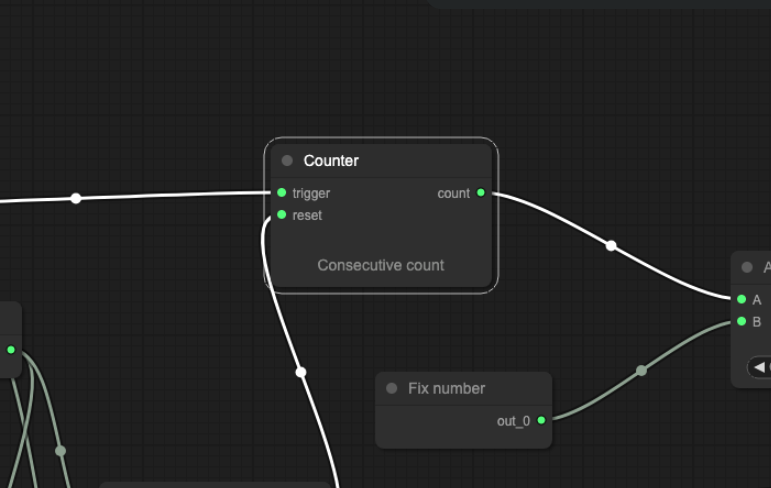
A single signal firing is often insufficient evidence of a meaningful market condition. Arrow Algo’s Counter block solves this by requiring that a condition is true a specified number of times before downstream logic treats it as confirmed — turning momentary noise into pattern recognition with a simple count threshold.
What Is a Counter Block?
The Counter block counts how many times an input condition has been true — either within a defined lookback window or since a reset event. It outputs the current count as a numeric value. Connect that output to a comparison block (e.g. count >= 3), and you have a condition that only fires after the underlying signal has appeared a minimum number of times.
Where other blocks react to individual signal occurrences, the Counter aggregates them. It answers the question: how many times has this condition been true recently? That question turns out to be useful across a surprisingly wide range of strategy logic.
How Does the Counter Block Count?
The Counter block takes two inputs:
- Count input: A binary signal. Each time this input fires (goes to 1), the counter increments by 1.
- Reset input: An optional binary signal. When this fires, the count resets to zero and counting begins again from scratch.
The block also takes a lookback window parameter — the number of recent bars over which occurrences are counted. Set to 20 bars, the counter outputs the number of times the input has been 1 in the most recent 20 bars, regardless of whether a reset has occurred. Without a lookback window, the count accumulates from strategy start or from the most recent reset.
The output is a numeric value — the current count. Feed this into a condition block with a threshold (e.g. output >= 3) to create a confirmations-required entry signal. Feed it into a comparison block to trigger only when count exceeds a maximum (e.g. output > 5 = overtrading alarm).
What Can You Count In a Strategy?
The Counter block works with any binary signal as its input. In practice, that means you can count:
- Consecutive conditions: How many consecutive bars a moving average has been rising, or how many bars RSI has stayed above 60.
- Signal occurrences in a window: How many times a crossover has fired in the last 20 bars — useful for identifying choppy, signal-rich environments where the strategy should step back.
- Entry attempts: How many times the entry condition has been true since the last trade closed — useful for rate-limiting re-entries after a loss.
- Candles of a specific type: How many bullish (close > open) candles have appeared in the last 10 bars — a count-based trend confirmation filter.
What Are the Most Practical Counter Block Applications?
Confirmation-required entries: Instead of entering on the first bar an RSI crosses above 50, require the RSI to have crossed above 50 at least twice in the last 10 bars. The Counter tracks these crossovers; the condition block gates entry until the count reaches 2. This reduces false entries on a single noisy signal without adding lag to the overall entry logic.
Consecutive-bar trend confirmation: A reliable trend filter counts how many consecutive bars the price has closed above a moving average. If the count reaches 5 or more, the strategy treats the trend as confirmed and enables long entries. The Counter provides this running tally automatically — no need for a fixed lookback comparison on every bar.
Choppiness detection: Count how many times a crossover signal has fired in the last 20 bars. If the count exceeds a threshold (say, 6 crossovers in 20 bars), the market is chopping. Connect the output to a gate that disables entry signals during high-crossover-frequency periods. This keeps the strategy out of sideways conditions where crossover strategies commonly underperform.
Overtrading limit: Count how many trades have opened in the current session. If the count reaches a defined maximum (e.g. 3 trades per day), disable new entries for the remainder of the session. The Counter tracks the daily entry count; a condition block closes the gate when the maximum is reached. This enforces a daily trade limit without needing manual monitoring.
What Pitfalls Should Traders Watch For?
Choosing the wrong lookback window: A short lookback window (5 bars) resets the count frequently, which can mean the threshold is rarely reached. A long lookback (100 bars) may count conditions that are no longer relevant to the current market environment. Backtest the strategy across different window lengths to find the setting that improves entry quality without over-filtering.
Confusing occurrence count with streak count: The Counter counts total occurrences in a window — not consecutive occurrences. If you need a streak (e.g. 5 consecutive up closes), combine the Counter with a reset that fires whenever the streak breaks. Without the reset, the Counter will include non-consecutive occurrences in its tally.
Not resetting between sessions or trades: Without an explicit reset, the Counter accumulates indefinitely from strategy start. In a live strategy running for months, a counter without a reset will reflect a count that encompasses far more history than is relevant. Use a session-based reset (via a Time Filter output) or a trade-based reset (on entry or exit) to keep the count anchored to the relevant window.
Building Counter-Based Logic in Arrow Algo
Arrow Algo’s visual block builder includes the Counter block alongside the other utility blocks. Setting it up requires four connections:
- Connect the condition you want to count to the Counter’s input — any binary signal works.
- Set the lookback window (or leave it uncapped and use a reset signal instead).
- Connect a reset signal if needed — a session start, trade close, or daily timer output works well.
- Wire the Counter output into a condition block: count >= N triggers the downstream logic.
The Counter pairs naturally with the Latch block for confirmation-hold logic: once the count threshold is reached, a Latch holds the confirmed state active until a reset fires — ensuring the strategy acts on confirmed conditions rather than re-evaluating the count every bar.
What Are the Key Takeaways?
- The Counter block counts how many times an input condition has been true within a lookback window or since a reset.
- It outputs a numeric count — connect this to a threshold condition to create confirmations-required logic.
- Core use cases: confirmation-required entries, trend streaks, choppiness detection, and daily trade limits.
- Set a meaningful lookback window or reset signal — an uncapped counter accumulates indefinitely and loses relevance over time.
- Occurrence count is not the same as streak count — add a reset for streak logic.
- Pair with the Latch block to hold confirmed states active beyond the bar the count threshold is reached.
Disclaimer: This content is for educational purposes only and does not constitute financial advice. Trading involves significant risk and you should only trade with capital you can afford to lose. Past performance is not indicative of future results. Always conduct your own research before making any trading decisions.
Ready to build your own automated trading strategies without writing a single line of code? Start for free at Arrow Algo and join thousands of traders who’ve made the switch to systematic trading.