
Time Filter Block: Complete Guide for Algorithmic Trading
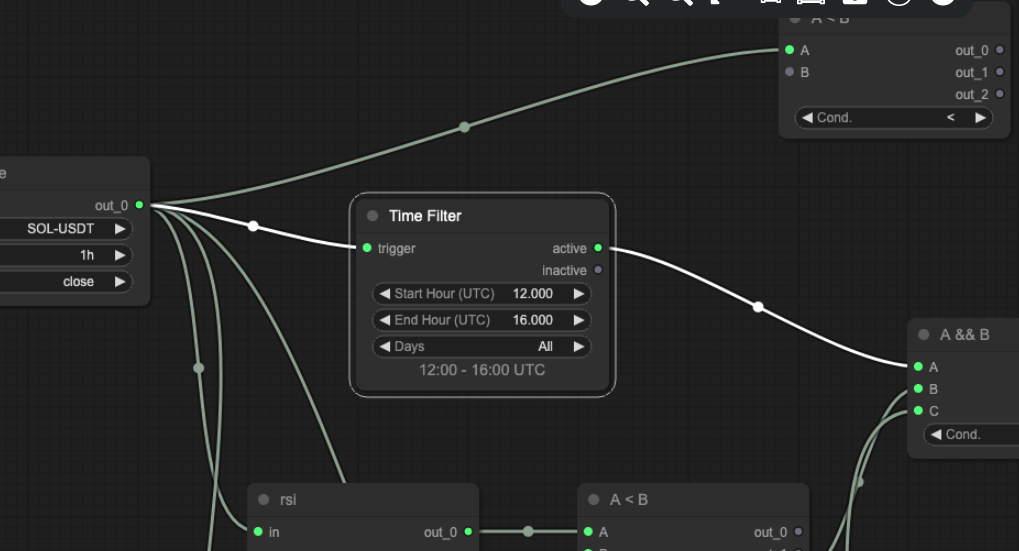
Not all trading hours are equal. Liquidity, volatility, and trend behaviour vary significantly across market sessions — and a strategy that performs well during the London-New York overlap may produce very different results during the Asian overnight session. Arrow Algo’s Time Filter block lets you define precisely when a strategy is allowed to execute, turning session-based logic into an automatic rule rather than a manual decision.
What Is a Time Filter Block?
The Time Filter block is a time-gating utility. It outputs 1 during a defined time window and 0 outside it. Connect this output to your strategy’s entry or exit logic, and the strategy activates and deactivates automatically based on the clock — no manual intervention required.
The block works in UTC time and supports both intraday windows (e.g. 08:00–16:00) and day-of-week filters (e.g. Monday to Friday only). These two settings combine to create precise, repeatable execution windows that remain consistent regardless of market conditions or news flow.
Why Does Session Timing Matter for Systematic Traders?
Crypto markets run 24/7, but participant behaviour is not uniform across all hours. Three distinct session patterns shape most crypto assets:
- Asian session (00:00–08:00 UTC): Generally lower volume and tighter ranges for BTC and ETH. Trend-following strategies that rely on momentum may underperform. Mean-reversion approaches can work well during this window.
- London session (07:00–12:00 UTC): Volume picks up as European institutional participants become active. Breakout and momentum strategies begin to show better performance characteristics.
- New York session (13:00–21:00 UTC): Typically the highest-volume window. Major macro data releases (CPI, PPI, FOMC, NFP) land during this session. Trend moves tend to initiate and confirm here. For many strategies, this is the highest signal-to-noise window of the day.
Backtests that include all 24 hours often mask session-specific performance. A strategy with a flat Sharpe ratio overall may have a strong positive Sharpe during New York hours and a near-zero or negative Sharpe during the Asian overnight — the Time Filter exposes and exploits this.
How to Configure a Time Filter
Arrow Algo’s Time Filter block takes two primary settings:
- Start time: The beginning of the allowed window, in UTC (e.g. 13:00 for the New York open).
- End time: The end of the allowed window (e.g. 21:00 for the US close).
- Day filter: Optional setting to restrict execution to specific days — typically Monday to Friday to exclude weekends, or specific days where the strategy shows stronger performance.
The output is a binary signal: 1 inside the window, 0 outside. Connect this to an AND condition with your entry signal — entries only execute when both the time filter output and the entry signal are active simultaneously.
To use the Time Filter as a macro event pause rather than a session window, simply invert the logic: the filter outputs 0 during the event window (e.g. 12:30–13:30 UTC for a CPI release) and 1 at all other times. This pauses execution around the release without affecting the rest of the trading day.
What Are the Best Time Filter Applications?
Session-optimised entry windows: Backtest the strategy separately for each session. Identify the window where the strategy’s edge is strongest — measured by Sharpe ratio, win rate, and average trade return. Apply a Time Filter to restrict entries to that window only. The strategy continues to manage open positions at all times; the filter only gates new entry signals.
Macro event avoidance: Define a narrow exclusion window around scheduled high-impact data releases — CPI, FOMC, NFP. A 30-minute window either side of the release time is typically sufficient. This avoids the unpredictable initial price spike without sacrificing the rest of the day’s trading. Yesterday’s CPI release that liquidated $350M in shorts illustrates exactly the kind of move that can be damaging if a strategy enters into it rather than after it.
Liquidity-aware execution: Some assets are more liquid at specific times. Bitcoin perpetual futures are most liquid during the New York afternoon. Altcoins often see better depth during Asian hours. Matching execution windows to peak liquidity for the specific asset reduces slippage and improves fill quality.
Weekend exclusion: Crypto weekends frequently feature lower volume, wider spreads, and gap risk around Sunday evening reopens. A day-of-week filter excluding Saturday and Sunday reduces exposure to these structural oddities without requiring any changes to the underlying strategy logic.
What Should Traders Avoid When Using a Time Filter?
Over-fitting to historical session windows: If a backtest shows that only trading between 14:37 and 16:12 UTC maximises returns, that window is almost certainly a data artefact rather than a genuine liquidity edge. Use sessions anchored to real market structure — major exchange opens, institutional trading hours, macro release schedules — rather than arbitrarily optimised intervals.
Filtering exits as well as entries: A Time Filter should gate new entries only in most cases. Filtering exits too means the strategy cannot close positions during excluded hours — potentially holding a losing trade through an overnight session or a weekend when the filter blocks the exit signal. Keep exits unrestricted unless there is a specific reason to limit them.
Ignoring position management during off-hours: Even if the strategy makes no new entries outside the filter window, open positions still need stop-loss management. Confirm that stop and exit logic operates independently of the Time Filter output — the filter should sit upstream of entry signals only.
How to Build Time-Filtered Strategies in Arrow Algo
Adding a Time Filter to an existing strategy in Arrow Algo is straightforward:
- Add a Time Filter block to the canvas and configure the start time, end time, and any day-of-week settings.
- Add a condition block set to AND.
- Connect your entry signal to one input of the AND block, and the Time Filter output to the other input.
- Connect the AND block output to your position entry logic.
- Run a backtest with the filter on and compare it to the unfiltered version — look for improvements in Sharpe ratio and drawdown without a proportional drop in total trades.
The Time Filter combines naturally with the Latch block — use the Latch to hold a signal state across session boundaries, and the Time Filter to control when new positions based on that signal are allowed to open.
What Are the Key Takeaways?
- The Time Filter block outputs 1 during a defined window and 0 outside it — gating strategy execution by the clock.
- Different sessions have different liquidity, volatility, and trend characteristics — filtering by session can significantly improve strategy consistency.
- The New York session (13:00–21:00 UTC) is typically the highest-signal window for trend-following strategies on BTC and ETH.
- Use a narrow inverted Time Filter to pause execution around macro data releases like CPI and FOMC.
- Filter entries only — leave exits and stop-loss logic unrestricted to avoid holding losing positions through off-hours.
- Always validate session-specific filters against genuine market structure, not arbitrarily optimised intervals.
Disclaimer: This content is for educational purposes only and does not constitute financial advice. Trading involves significant risk and you should only trade with capital you can afford to lose. Past performance is not indicative of future results. Always conduct your own research before making any trading decisions.
Ready to build your own automated trading strategies without writing a single line of code? Start for free at Arrow Algo and join thousands of traders who’ve made the switch to systematic trading.