
Timer Block: Complete Guide for Algorithmic Trading
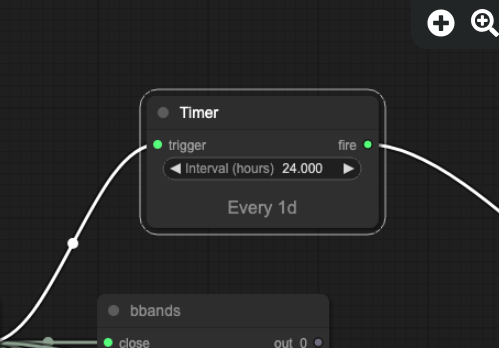
Most trading signals tell a strategy when to enter. Fewer define a precise moment when time simply runs out. Arrow Algo’s Timer block gives strategies an explicit time dimension — counting bars since an event and firing an output signal when the specified number of periods has elapsed.
What Is a Timer Block?
The Timer block is a countdown utility. It starts counting from a trigger event and fires an output signal once a defined number of bars have passed. Until the countdown completes, the output remains inactive. Once the bar count is reached, the output fires — and that signal can connect to an exit, a re-entry gate, or any other block downstream.
Think of it as a strategy alarm clock. You set the number of bars, define the trigger that starts the count, and the Timer handles the rest automatically — no manual monitoring required.
How Does the Timer Block Work?
The Timer block takes two inputs:
- Start input: A binary signal that starts the countdown. Any block output — a crossover, a condition, an entry signal — can serve as the start trigger. When this input fires, the Timer begins counting bars.
- Bar count (N): The number of bars to count before the output fires. Set to 10, the output fires on the 10th bar after the start trigger.
The output is a binary signal: 0 during the count, 1 on bar N. This single output pulse can connect to any downstream logic — typically an exit condition or a gate that re-enables entry signals.
If the start input fires again before the count completes, the Timer resets to zero and begins a fresh count from the new trigger. This reset behaviour means rapid signal sequences do not stack multiple countdowns — the most recent trigger always governs.
What Problems Does a Timer Block Solve?
The Timer block solves three common problems that arise in systematic strategy building:
Time-based exits with no price target: Some strategies — particularly scalps and short-term momentum plays — do not benefit from holding until a specific price level. They benefit from holding for a fixed number of bars and exiting. A Timer block connected to the exit logic implements this rule cleanly, without requiring a fixed stop or target that may not suit every market condition.
Signal cooldown periods: After a trade exits, many strategies should not immediately re-enter. A cooldown prevents overtrading on reverting signals. Connect the Timer to the re-entry gate: the gate remains closed for N bars after exit, then opens automatically. No manual restriction needed.
Minimum hold times: A strategy might generate a valid exit signal one bar after entry — noise rather than a real reversal. A Timer that delays exit evaluation for a minimum number of bars filters this out. Exit signals are only evaluated after the minimum hold period has passed.
What Are Practical Timer Block Applications?
Fixed-duration scalp exits: A scalp strategy enters on a momentum signal and exits after a defined number of bars — for example, 3 bars on a 15-minute chart (45 minutes total). The Timer fires on bar 3 and the position closes. The strategy has no price target: duration defines the trade, not a specific level.
Re-entry cooldown: After a stop-loss is hit, the strategy waits 20 bars before the next entry is allowed. The Timer starts on stop-loss exit and outputs 1 on bar 20, which re-enables the entry gate. This prevents the strategy from chasing a series of false signals in a choppy market.
Earnings or macro event hold: Some strategies should avoid opening new positions within a certain number of bars of a scheduled macro release. A Timer triggered by a time-flag block can impose a pre-event hold — blocking new entries for N bars leading into the event, then automatically releasing after the window closes.
Position review cadence: A strategy that dynamically adjusts position size or stop-loss levels may do so more effectively on a fixed schedule than bar by bar. A Timer firing every N bars can trigger a periodic review block — re-evaluating conditions on a defined cadence rather than reacting to every price tick.
What Should Traders Avoid When Using Timers?
Over-relying on fixed bar counts: A timer exit set to 10 bars on a 1-hour chart behaves very differently on a daily chart. The number of bars alone means nothing — the time duration it represents depends entirely on the timeframe. Always think in terms of actual elapsed time (hours, days) and convert to the appropriate bar count for your chosen timeframe.
Conflating the Timer with the Time Filter: The Time Filter block restricts execution to a clock-defined window (e.g. 13:00–21:00 UTC). The Timer block counts bars from a trigger event. These blocks solve different problems. The Time Filter is for session-based gating; the Timer is for countdown-based logic triggered by strategy events.
Ignoring open positions when the Timer fires: If the Timer is used as a re-entry gate (cooldown), it only controls new entries. Any open position established before or during the cooldown period continues under its own exit rules. The Timer does not interact with existing positions unless explicitly wired to do so.
Setting N too low on volatile timeframes: A 3-bar timer on a 1-minute chart gives the trade 3 minutes to resolve. Most meaningful moves take longer. A timer that fires too quickly creates a high-frequency of time-based exits that can erode performance through transaction costs.
How to Add a Timer Block to Your Strategy in Arrow Algo
Arrow Algo’s block builder includes the Timer block in the indicator library. The setup is straightforward:
- Add a Timer block to the canvas and set the bar count (N) — the number of bars to count before the output fires.
- Connect your trigger signal to the Timer start input — typically your entry signal or an exit event signal.
- Wire the Timer output (the single pulse on bar N) to the downstream logic — an exit condition, an entry gate, or a position review block.
- Backtest and inspect the debug timeline to confirm the Timer fires at the expected bar count and the downstream logic responds correctly.
For more complex time-state logic — where a timer should hold a persistent state rather than fire a single pulse — combine the Timer with a Latch block: the Timer pulse sets the Latch, which then holds the state until a separate reset condition fires.
What Are the Key Takeaways?
- The Timer block counts bars from a trigger event and fires a single output pulse on bar N.
- It solves three problems: time-based exits, signal cooldowns, and minimum hold times.
- Bar count must be interpreted relative to the strategy’s timeframe — always think in actual elapsed time.
- The Timer fires a pulse, not a persistent state — use a Latch downstream if persistent state is needed.
- Do not confuse with the Time Filter block, which gates execution by clock time rather than counting from a trigger.
- Arrow Algo’s visual block builder includes the Timer block — no code required to implement countdown-based strategy logic.
Disclaimer: This content is for educational purposes only and does not constitute financial advice. Trading involves significant risk and you should only trade with capital you can afford to lose. Past performance is not indicative of future results. Always conduct your own research before making any trading decisions.
Ready to build your own automated trading strategies without writing a single line of code? Start for free at Arrow Algo and join thousands of traders who’ve made the switch to systematic trading.